What Is Data Security and Privacy in Wellness Apps
You've just finished writing an unusually honest journal entry. It might mention poor sleep, a change in mood, a dose, an uncomfortable side effect, or a pattern you haven't told anyone else about. You tap save, lock your phone, and move on with your evening.
But what happens to that entry after the screen goes dark? Who can access it, which vendors might process it, whether it appears in analytics or backups, and what remains after you delete it are all part of the answer to what is data security and privacy. Wellness journals deserve these questions because they can contain health-related and behavioral details that are far more revealing than ordinary app notes.
Table of Contents
- Why Your Wellness Journal Deserves a Privacy Question
- Data Security and Privacy Defined Without the Jargon
- The Core Principles That Actually Protect Your Entries
- How a Microdosing Journal Handles Sensitive Data
- Common Privacy Promises That Hide Real Gaps
- A Practical Checklist Before You Trust Any Wellness App
- Putting Security and Privacy Together as One Lifecycle
- Frequently Asked Questions About App Data Protection
Why Your Wellness Journal Deserves a Privacy Question
At the end of a difficult day, a person may open a wellness app and write: “Felt anxious after changing my routine. Slept badly. Noticed a stronger reaction than last time.” A later entry might add a time, a dose, a location, or a reflection about medication, substance use, relationships, or work. None of those details needs to include a formal diagnosis to reveal something personal.
That's why a wellness journal isn't just a digital notebook. Mood ratings, dose records, sleep patterns, searchable reflections, and time-of-day routines can reveal health status, treatment-seeking behavior, emotional patterns, or possible substance use. The sensitivity comes from the combination of details, not only from the words a user types.

The entry has a longer life than the screen suggests
When you press save, the information may travel from your phone to a server. The service may place it in a database, replicate it into a backup, process limited information for error reporting, or make it available through a web dashboard. If you export your journal, a new copy may appear in your downloads folder, cloud drive, email account, or another application.
Each step creates a question about security, which protects information from unauthorized access, alteration, disclosure, or destruction. It also creates a question about privacy, which governs why the information was collected, who may use it, how long it remains available, and what control you have over it.
Practical rule: Don't ask only whether an app is secure. Ask where your entry goes, who can process it, and what happens to every copy.
A privacy policy should help you answer those questions in plain language. If you want a useful framework for thinking about ownership and control, this guide to personal data ownership can help you examine what rights the app gives you over your own records.
Why deletion and export belong in the first conversation
A service can protect its primary database while leaving uncertainty around backups, exports, logs, or third-party tools. A delete button may remove an entry from your view without explaining when copies disappear from systems used for recovery. An export may give you control while also creating an unprotected file that anyone with access to your device can open.
The practical standard is a complete lifecycle account. Before trusting an app with intimate reflections, look for clear answers about collection, transmission, storage, processing, sharing, backups, export, retention, and deletion. If a company can explain only the lock on the front door, you still don't know what happens inside the building.
Data Security and Privacy Defined Without the Jargon
You write a private reflection about your mood, medication, or a difficult day. The app stores it somewhere, sends parts of it through other systems, and may create copies for recovery or analysis. Two questions follow: how is that information protected, and who decides what happens to it?
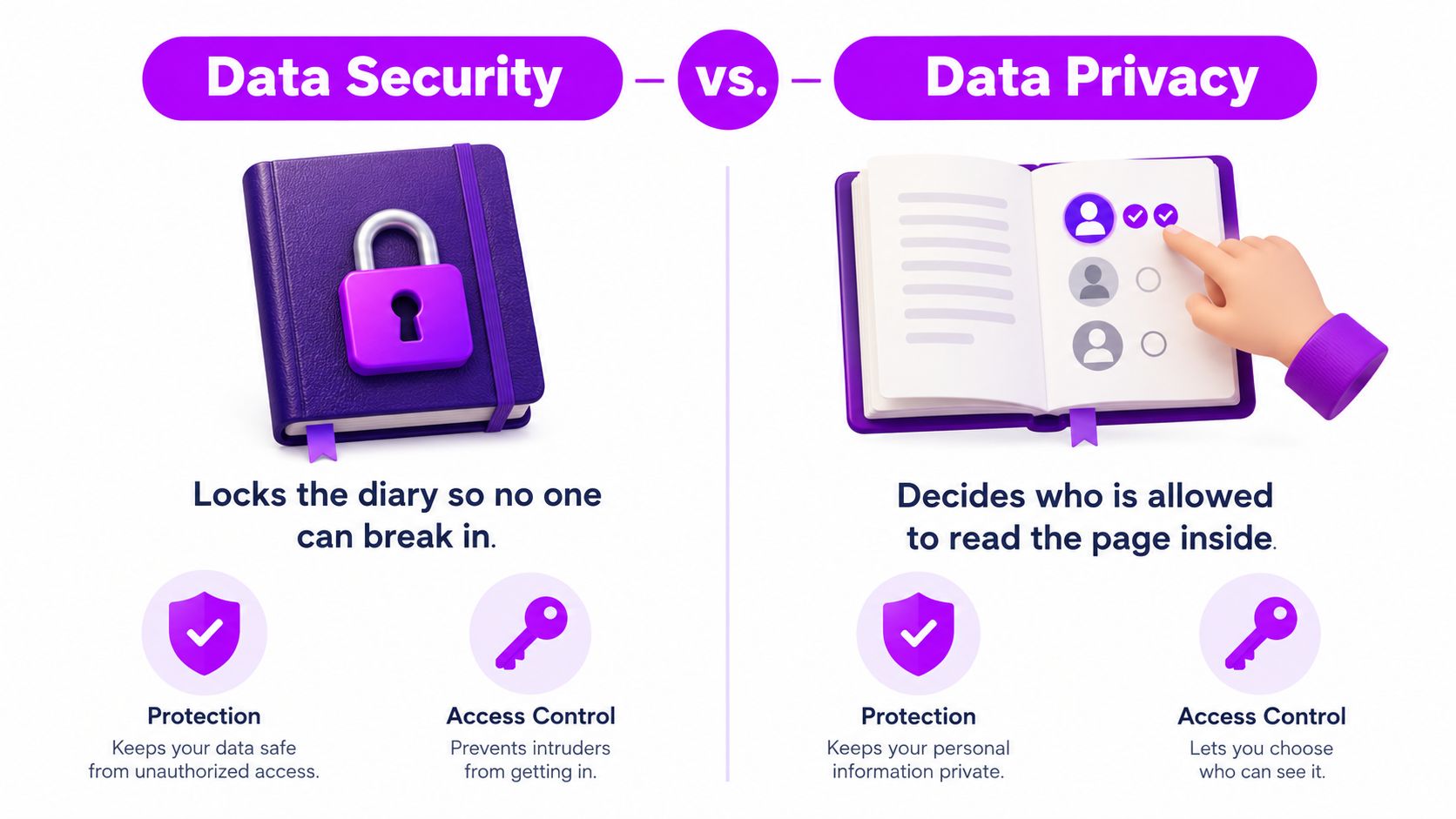
Data security is the lock. It covers the technical and organizational controls that stop unauthorized people from opening, changing, copying, or destroying your journal. In an app, those controls can include encryption, authentication, access permissions, monitoring, secure backups, vulnerability management, and incident response.
Data privacy is the decision about the page. It governs what the app records, why it needs each detail, who may read it, whether another organization receives a copy, how long the information stays available, and whether you can correct, export, or erase it.
Security asks who can get in
Security protects information as it moves, sits in storage, and passes through connected services. Encryption in transit makes an entry harder to read while it travels between your phone and the app. Encryption at rest helps protect it on a device, server, backup system, or other storage if someone obtains the underlying files.
Authentication checks whether the person signing in is the account owner. Access control sets which employees, vendors, and software systems can view or modify information. Monitoring and audit logs can reveal unusual access. Backups and tested recovery procedures help restore availability after a failure, while also creating copies that need protection and eventual deletion.
Security reduces unauthorized access and limits the harm caused by technical failure or compromise. It does not decide whether the app needed your exact location, whether an analytics vendor should receive your reflection, or whether an exported file remains exposed on your device.
Privacy asks what happens to the information
Privacy covers the rules and decisions that govern personal information inside and outside the app. For a wellness journal, ask:
- Collection: Which fields are required, and which are optional?
- Purpose: Does the app need the information for the feature you chose?
- Access: Can support staff, contractors, or vendors read entries?
- Sharing: Does the service send information to analytics, advertising, research, or infrastructure partners?
- Retention: How long does it keep entries, account details, logs, backups, and exports?
- User control: Can you export, correct, restrict, or delete your information?
The General Data Protection Regulation's principles helped make purpose limitation, data minimization, storage limitation, transparency, and individual rights central to modern privacy discussions. These principles remain a useful test even when an app is not based in the European Union.
A locked diary still creates a privacy problem if its owner secretly photocopies every page for unrelated purposes. A service can also describe respectful data use while leaving journal text exposed through a vendor, backup, or analytics pipeline. Security limits unauthorized access. Privacy limits unjustified collection and use. You need both.
The Core Principles That Actually Protect Your Entries
A trustworthy wellness app uses several protections together. No single control can compensate for a missing layer elsewhere. Encryption can protect a database from casual inspection, but it won't stop an attacker who takes over an administrator account. Minimal collection can reduce exposure, but it won't protect the information the service does keep.
Encryption protects data in motion and at rest
When an entry travels from your phone to a server, encryption in transit scrambles the connection so an interceptor can't easily read it. When the service stores the entry, encryption at rest protects the data on disks and other storage systems. You can learn more about the storage side in this explanation of encryption at rest.
Ask whether encryption covers the primary database, backups, logs, and exported files. A service that protects its main database but leaves a backup or support copy readable has created a weaker side door.
Access control limits the number of readable copies
Access control applies the principle of least privilege. A customer-support employee may need to resolve an account problem without reading private reflections. An engineer may need error logs without access to journal text. Role-based permissions separate those responsibilities, while audit logs record sensitive access for review.
Strong authentication matters here. The National Institute of Standards and Technology's guidance on multifactor authentication defines MFA as using at least two different factors, such as something you know, something you have, or something you are. NIST identifies FIDO authenticators used with the Web Authentication API as phishing-resistant options, while passwords and manually entered one-time codes can still be captured through phishing.
De-identification reduces exposure during analysis
An app may want to understand feature use or identify technical problems without sending raw journal text into an analytics system. Pseudonymization replaces direct identifiers with tokens. Anonymization aims to make it very difficult to identify a person from the remaining information, including information combined with other reasonably available data.
Removing a name isn't automatically enough. Dates, rare routines, unusual dosing patterns, free-text reflections, location details, and account metadata can identify someone when combined. The NIST Privacy Framework emphasizes lifecycle mapping, data minimization, individual participation, and disassociability, which means reducing the connection between a person and the data whenever the feature doesn't require that connection.
Minimization and retention limits shrink the target
The safest sensitive field is often the one an app never collects. If a mood feature doesn't need precise location, the service shouldn't request it by default. If a troubleshooting tool doesn't need journal text, it shouldn't receive journal text.
Retention completes the principle. The Federal Trade Commission's guidance on protecting personal information recommends keeping sensitive information only while there's a legitimate business reason to retain it, with a written policy for protection, duration, and secure destruction. A retention policy that never removes old entries turns every past reflection into part of the future breach surface.
How a Microdosing Journal Handles Sensitive Data
A microdosing journal makes the lifecycle easier to see because an entry often combines several sensitive fields. A user might record a dose detail, a mood score, sleep quality, the time of day, and a free-text reflection. The app should protect each part from the moment it's entered, not only after it reaches long-term storage.
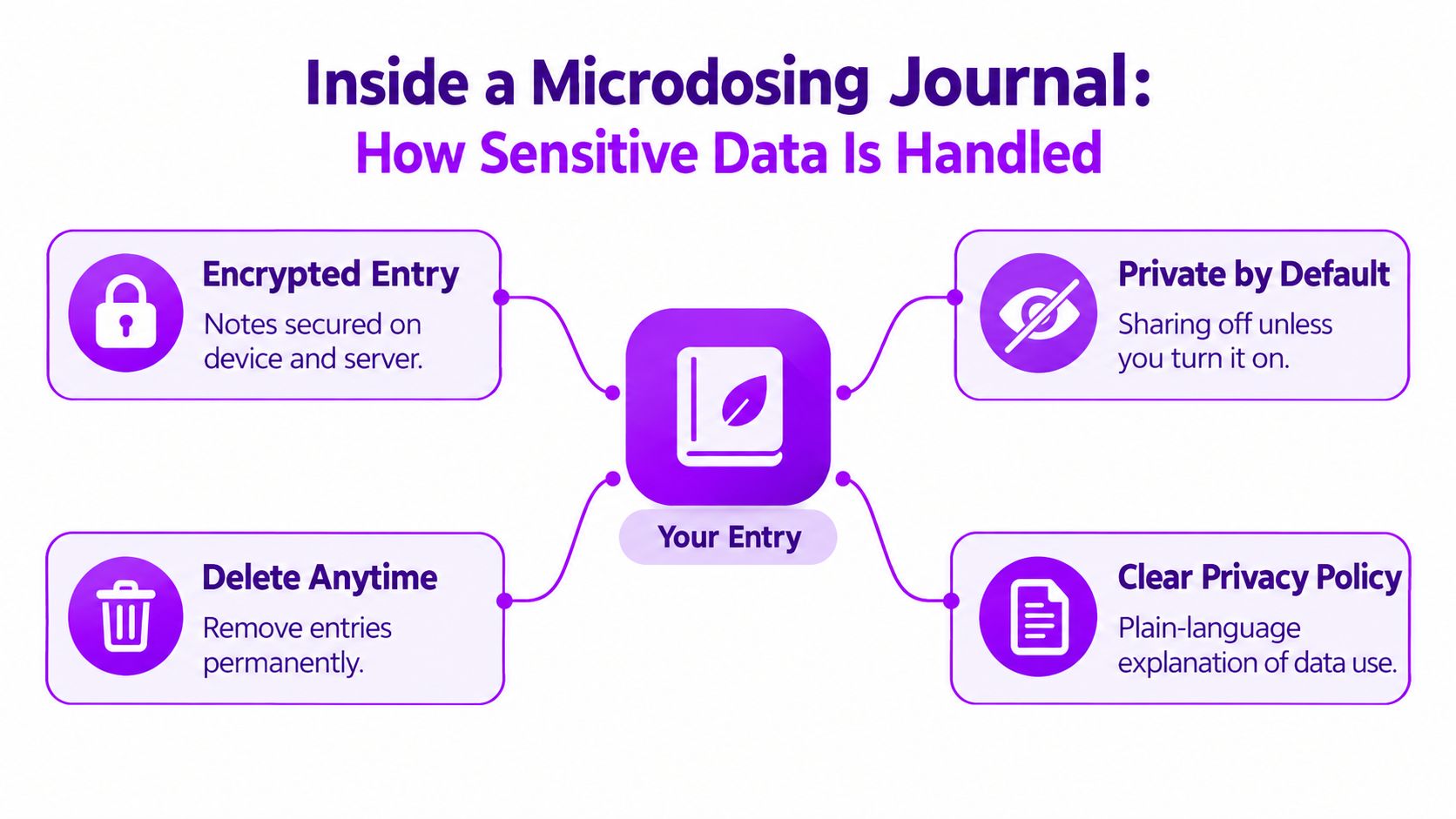
Start with the phone. A local-first design can keep information on the device and synchronize it through an encrypted connection when sync is needed. A PIN or biometric lock protects the app from casual access on the device, but it shouldn't be confused with server-side encryption or account security.
Follow the entry through the service
The connection between the phone and server should use encrypted transport. Stored entries should be encrypted at rest. Internal systems should use access controls so only authorized systems and personnel can reach the data they need.
Analytics creates a separate decision. A company might measure whether a screen loads correctly without receiving the user's full reflection. It can separate technical event data from journal content, remove direct identifiers where possible, and document which vendors process each category. A clear vendor boundary tells users whether infrastructure providers, crash-reporting services, or analytics tools can handle readable content.
Export creates another copy under the user's control. CSV export can be useful for personal analysis, but the exported file may no longer receive the same protections as the app. Users should choose a secure destination, avoid sending the file through an exposed channel, and delete unnecessary copies from downloads and cloud storage.
Compare features with the privacy result
| App behavior | What it should mean for the user |
|---|---|
| Local-first storage with encrypted sync | Entries stay protected on the device and during synchronization |
| Optional fields and limited metadata | The service collects less information than a fully detailed profile would |
| Granular export | The user can choose what to take out instead of creating an indiscriminate copy |
| Clear vendor boundaries | The user can understand which outside systems may process information |
| Deletion that reaches backups | Removing an entry isn't limited to hiding it from the interface |
The most useful test is to ask the app to explain the journey in ordinary language. If the answer skips backups, exports, analytics, or deletion timing, the product has left out part of the experience that matters most.
Common Privacy Promises That Hide Real Gaps
Privacy language often sounds reassuring because it compresses a complicated system into a short phrase. The problem isn't always that the statement is false. The problem is that users may reasonably interpret it more broadly than the company intends.
| Common Claim | What Users Assume | What Often Happens |
|---|---|---|
| “We don't sell your data” | Nobody outside the company receives it | Vendors may still process information for hosting, analytics, support, or crash reporting |
| “End-to-end encrypted” | Every copy is unreadable to everyone else | The phrase may not explain backups, account recovery, metadata, or whether the service can access content |
| “Your app is locked” | The journal is encrypted everywhere | A device lock protects the screen, but cloud storage and staff access require separate controls |
| “Delete your account anytime” | Every copy disappears immediately | The interface may remove access while backups, logs, or legal-retention copies follow a separate schedule |
| “HIPAA-grade security” | A specific legal protection applies | Marketing language may describe a security aspiration without explaining the company's legal role or actual controls |
Not sold doesn't mean not shared
A service can avoid selling data while still sharing it with a processor. Hosting providers, error-reporting tools, customer-support platforms, and analytics services may receive information under contracts. The important questions are whether they receive raw journal content, identifiable metadata, or only limited technical events.
Ask, “Is my readable entry sent to any vendor?” Also ask, “Are dates, location signals, account identifiers, or usage patterns shared even when the text itself isn't?”
Backups and exports are part of the promise
Primary storage and backup storage may use different systems, permissions, and deletion processes. A company should explain whether backups are encrypted, how access is controlled, and how long deleted information can remain in recovery copies.
Exports deserve equal scrutiny. Once a CSV file leaves the app, its protection depends on your phone, computer, cloud account, and sharing habits. A secure app can't control every later copy, but it can warn you clearly and provide a deliberate export process.
A delete button needs a definition
“Delete” should tell you what disappears, when it disappears, and which exceptions apply. Look for separate language about active records, backups, audit logs, fraud-prevention records, and legally required retention. If the policy uses broad phrases such as “we may retain information as necessary” without explaining the categories, treat that ambiguity as a reason to ask for clarification.
A Practical Checklist Before You Trust Any Wellness App
Use this checklist before entering intimate reflections. You don't need to understand every technical implementation, but you should receive direct answers to each question.
Read the privacy policy for purposes. Confirm why the app collects mood, dose, sleep, location, or free-text information. A red flag is a broad purpose such as “improving services” with no explanation of whether that includes profiling, advertising, or model training.
Find the retention rule. Look for how long active entries, deleted entries, logs, and backups remain. Be cautious if the policy describes indefinite retention or doesn't mention deletion from backups.
Identify outside processors. Check whether hosting, analytics, crash reporting, support, or payment vendors can process personal information. Vague references to “trusted partners” don't tell you enough.
Confirm encryption in transit and at rest. Ask whether both protections cover journal text, backups, and synchronization. “Secure app” by itself isn't a technical answer.
Ask who can read entries. Look for role-based access, least-privilege permissions, audit logging, and a statement about staff access. If every employee can supposedly access everything, the design deserves scrutiny.
Turn on strong account protection. Use a unique password and MFA where available. Prefer a passkey or security key for sensitive accounts when the service supports it. A device PIN or biometrics helps, but account recovery and cloud sync still need protection.
Test export before you rely on the service. Confirm what the export contains and whether it includes metadata as well as journal text. Store the resulting file deliberately, then remove test copies you don't need.
Test deletion with a low-risk entry. Check whether the app explains the deletion process and whether you receive confirmation. A red flag is a delete control with no policy language about backups or retained records.
Disable optional analytics. If the app lets you opt out of diagnostic or behavioral analytics, review that setting before recording sensitive information. Ask whether opting out affects core journal features.
Look for independent evidence. A security audit, penetration test summary, vulnerability disclosure process, or clear incident-response policy can provide more substance than promotional copy. No public evidence doesn't prove poor security, but it gives you less to evaluate.
For a broader set of privacy habits, these data privacy best practices can help you review permissions, account settings, and copies of exported data.
Putting Security and Privacy Together as One Lifecycle
You write a sensitive reflection, tap save, and assume the story stays inside the app. It may also travel through a connection, database, backup system, analytics pipeline, or service provider. Security and privacy work best as one loop, beginning when the app first asks for information and continuing until every copy is handled.
At collection, privacy asks whether each field is needed and whether you understand its purpose. At transmission, security protects the connection between your device and the service. At storage, encryption and access controls help protect readable entries, account details, and supporting metadata. During processing, data minimization and de-identification limit what analytics and operational tools can use.
Backups require separate attention. Protecting the primary database does not automatically protect recovery copies, which may have different access controls or retention periods. The same applies to vendors that host infrastructure, provide analytics, or handle support. An export also creates a new copy outside the service's direct control, so the app should explain what the file contains and how to store it safely.
At deletion, privacy asks whether you can make a real choice. Security asks whether the organization can carry out that choice safely and confirm what happened. Its records should explain the treatment of active entries, replicated storage, backups, logs, analytics data, and vendor-held copies.
Incident response completes the loop. The GDPR breach-notification requirement says an organization generally must notify the relevant supervisory authority without undue delay and, where feasible, within 72 hours of becoming aware of a qualifying breach. A notice should describe the breach, the affected people and records, likely consequences, and corrective or mitigating measures.
Review the lifecycle yourself: export a journal, inspect the file, check sharing and analytics settings, and delete the test copy. Revisit these choices after major app updates.
Frequently Asked Questions About App Data Protection
What should an app do after a breach?
The app should contain the incident, determine what was accessed, preserve relevant logs, repair the weakness, and communicate clearly with affected users. A useful notice explains what happened, which information may be involved, the likely consequences, and the measures being taken to reduce harm. Under the GDPR breach notification rules, organizations generally have to notify the relevant supervisory authority within 72 hours when a qualifying breach creates risk, unless an exception applies. Users should also receive practical guidance, such as changing credentials and reviewing account access.
Does MFA still matter if I use Face ID or another biometric?
Yes. Face ID or another biometric can protect access to your device or app, while your account may still be exposed through password recovery, a new device, or synchronization. MFA adds an independent factor to those routes. NIST recommends phishing-resistant options, including passkeys or security keys, for systems that protect sensitive information. Passwords alone do not resist phishing. Treat biometrics as one layer, not a replacement for account-level protection.
What does data retention mean after I delete an entry?
Retention means the length of time an organization keeps information for a stated purpose. Deleting an entry should normally remove it from active access, but copies may follow separate schedules in backups, logs, analytics systems, or vendor environments. Ask whether deletion covers active data, recovery copies, and legally retained records. The FTC advises organizations to keep sensitive information only while there is a legitimate business reason and to define secure destruction in a written policy.
If an app doesn't sell my data, can it still share it?
Yes. “Not sold” may still permit processing by a hosting company, analytics vendor, crash-reporting service, or support provider. An analytics tool might receive an account identifier, event time, device details, or feature usage without receiving journal text. Combined, those details can still contribute to a profile. Ask which vendors receive data, which fields they receive, why they receive them, and whether you can opt out.
How can I verify a privacy claim instead of trusting marketing?
Read the privacy policy and security documentation together. Look for specific information about encryption, staff access, vendors, backups, retention, deletion, exports, breach response, and independent testing. Use a low-risk entry to test the product, export it, inspect the file, and try deleting it. You cannot verify every internal control, but specific documentation and consistent product behavior provide stronger evidence than labels such as “private” or “secure.”
MicroTrack offers structured microdosing journaling with flexible entries, mood tracking, searchable history, CSV export, encrypted transmission and storage, and one-click account deletion. To examine its approach to wellness data, visit MicroTrack and review the privacy details before logging anything.